
As an alternative to starting a ROBAR-SV instance in the INSTANCES menu, you can also start a ROBAR-SV instance using START. The ROBAR-SV instance selected most recently in the INSTANCES menu is preset, i.e. the name of its interface-specific configuration file is displayed. In both cases you start the ROBAR-SV processes for communicating with the archive system and with the BS2000 systems.
Before starting a ROBAR-SV instance in ROBAR operation for the first time, please also observe the information in the section "Requirements for ROBAR operation".
When you select the START menu, a form appears for starting the ROBAR-SV instance (communication with the archive system) and the ROBAR-CMX processes (communication with BS2000). In addition, obsolete trace files of the ROBAR-SV instance can be deleted.
You move from one form field to another using the "arrow up" or "arrow down" keys.
Pressing the [ENTER] key starts the ROBAR-SV instance. The connection setup to the archive system or the BS2000 system is logged in the last line. Then the main menu reappears.
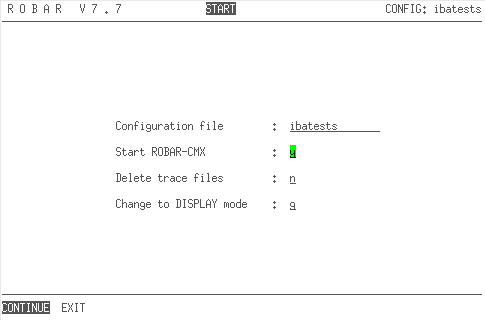
Figure 17: Menu for starting a ROBAR-SV instance
Definition of the form fields
configuration file
Name of the configuration file (= name of the ROBAR-SV instance). This form field cannot be changed.
Start ROBAR-CMX
Connection setup of ROBAR-SV to the BS2000 system.
Press the spacebar to select either:y: start ROBAR-CMX, orn: do not start ROBAR-CMX
Delete trace files
Press the spacebar to select either:
y Deletion of trace files
The following trace files are deleted:
- CMX trace files (
inotrc.*) - Trace files of the ROBAR-SV instance
- Backed-up trace files (see
RECOVER_DISK_FULLscript, "Automatic disk storage monitoring")
- CMX trace files (
n Rename the trace files to xxx.<timestamp>
(xxx = file name of the trace file)
Change to DISPLAY mode
Press the spacebar to select either: n: return to the main menu g: change directly to DISPLAY mode with graphical display t: change directly to DISPLAY mode with tabular display
START provides the following parameters:
CONTINUE
Starts the selected ROBAR-SV instance.
EXIT
Returns you to the main menu without starting the ROBAR-SV instance.