
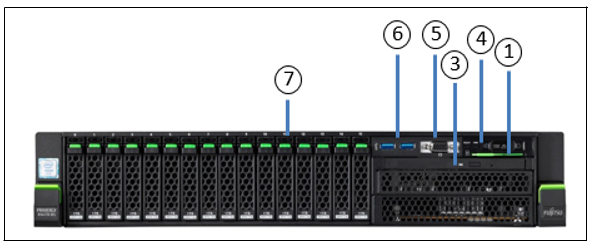
Figure 1: Server Unit SU310 (front)
No. | Meaning |
1 | ID card (green) |
3 | Optical drive activity indicator |
4 | Operating panel (for details see figure 2) |
5 | Video port (for Customer Support only) |
6 | USB ports (2x, for Customer Support only) |
7 | HDD indicators |
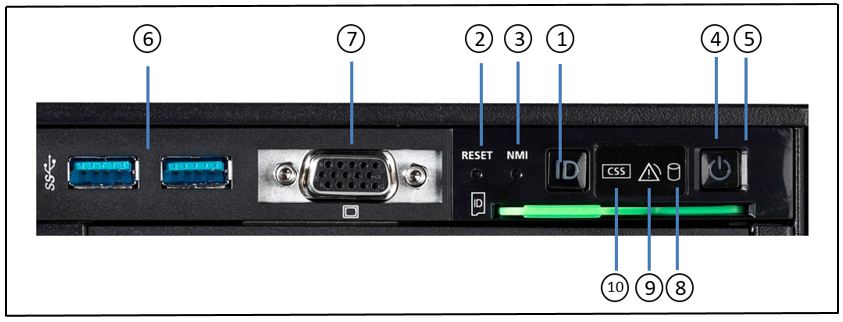
Figure 2: SU310 front - Detailed view: Operating panel
No. | Meaning |
1 | ID button/ ID indicator |
2 | Reset button |
3 | NMI button |
4 | On/Off button / Status indicator |
5 | Status indicator (power cable connected) |
6 | 2x USB ports (for Customer Support only) |
7 | Video port (for Customer Support only) |
8 | HDD activity indicator |
9 | Global error indicator |
10 | CSS indicator |
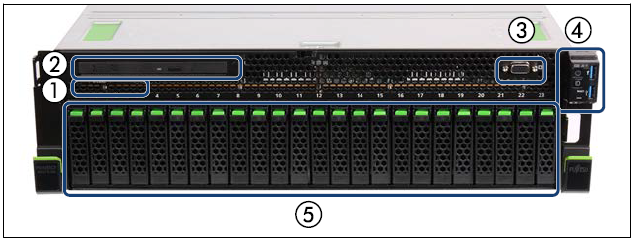
Figure 3: Server Unit SU320/SU330/SU330B (front)
| No. | Meaning |
|---|---|
| 1 | ID card |
| 2 | Optical disk drive (optional) |
| 3 | Video port (for Customer Support only) |
| 4 | Operating panel (for details see figure 4) |
| 5 | 2.5-inch HDDs/SSDs/PCIe-SSDs (8x, 16x or 24x) |
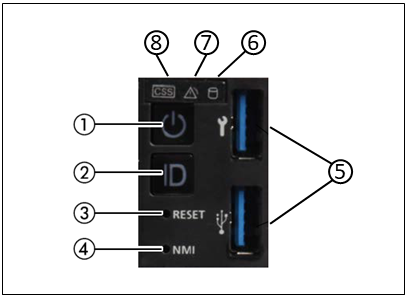
Figure 4: SU320/SU330/SU330B front - Detailed view: Operating panel
| No. | Meaning |
|---|---|
| 1 | On/off switch / status indicator |
| 2 | ID button |
| 3 | Reset button |
| 4 | NMI button |
| 5 | 2x USB 3.0 port |
| 6 | HDD/SSD activity indicator |
| 7 | Global error indicator |
| 8 | CSS indicator |
ID card
You can pull the ID card (see figure 1/3) out and push it in again as far as it will go.
The ID card contains various system information, e.g. product name, serial number, MAC addresses and DNS name.